Details
- Release date: March 24, 2025
- Genre: Role-Playing
- Developer: Empalu, !Alex Wolfson
- Publisher: Love Muffin
- Platforms: Steam
This item is not currently available at any of the stores that Deku Deals tracks.
Description
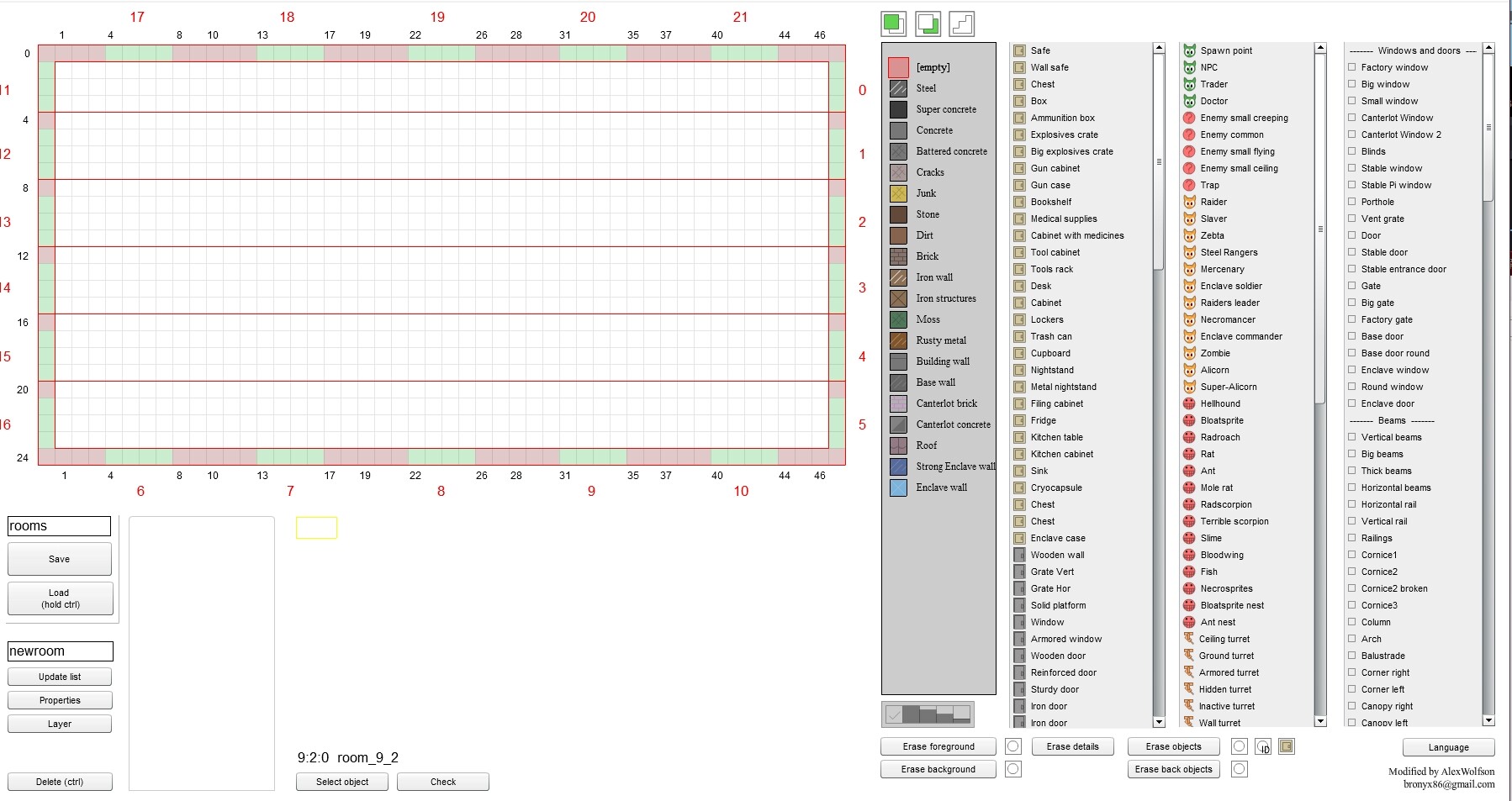
English text translated by!Alex Wolfson. The Game Editor DLC allows players to create, customize, and modify their in-game content with ease.
The room map files are in XML format and are stored in the "Rooms" folder. One file contains all the rooms for a single location.
To load a file, enter the path starting from the "Rooms" folder, for example, "rooms/rooms_mane" without the ".xml" extension, then click "Load" while holding Ctrl (this is to prevent accidental loading, as there is no confirmation).
Saving is done through the standard dialog window.
The editor can operate in two modes: for randomly generated locations (random) and for locations with a fixed map (non-random). They are distinguished by the tag for fixed maps at the beginning of the file, which can be added manually through a text editor.
When loading a map, the editor will automatically select the correct mode, whether it has this tag or not.
In the second mode, the editor will display the overall map, while in the first, only the list of rooms will be shown.
The "Update list" button creates a new room based on an existing one by entering a new name and clicking the button. A copy of the room will appear in the list with the new name.
To create a new room in a location with a fixed map, click on an empty spot for the room and begin editing. You must ensure that the passages match the neighboring rooms!
The "Properties" button shows the room's properties. Rooms and objects have properties set in XML format. Be careful with syntax!
The "Layer" button toggles between the front/back layers of rooms for fixed maps. For random maps, individual room properties need to be set.
The "Delete" button removes a room (Ctrl must be held down).
The "Select Object" button is for selecting an object and viewing or changing its properties. To move an object, you must modify its x and y properties. You can also change the object's type by modifying its id. See below for all other properties.
The "Check" button checks the XML syntax in the properties and formats it.
Room Parameters:
test="1": For testing a new room; it will be prioritized by the generator and won't depend on the level.
tip: Room type.
uniq="1": Will be the only one in the location, works similarly to tip="uniq".
entip: Type of random enemies: 0 for monsters, 1 for raiders, 2 for robots, 3 for slavers, 4 for mercenaries, 5 for alicorns, 6 for zebras, 7 for Steel Rangers.
back="X": X is the second-layer room for this room. To assign a second-layer room to a regular room, set back="X", where X is the name of the second-layer room. The second-layer room should have tip="back" to exclude it from random selection.
level: Level. For example, level="2" makes the room appear only from the second level of a random location.
base="1": Safe zone, such as a base camp (no weapons, telekinesis, or container opening allowed).
bezdna="1": Falling down leads to the lower location, even during combat; if no lower location exists, it returns to the checkpoint.
nomap="1": Map is disabled in the Pip-Boy.
retdark="1": Return fog of war.
levitoff="1": Self-levitation and flight are forbidden.
portoff="1": Teleportation is disabled.
desoff="1": Walls are indestructible.
petoff="1": No companion.
noblack="1": No fog of war.
Object Parameters (set through the map):
id: Object type identifier (e.g., crate, container, or specific unit).
uid: Unique identifier for script access.
code: Unique internal code for the object, generated automatically. If two objects have the same code, one will affect the other, causing bugs.
Active area (invisible rectangular area that reacts to the player's entry):
Commands :
Specific Unit Parameters:
turn: If greater than 0, turns right; if less than 0, turns left.
hpmult="X": Multiply unit's HP by X.
ai: AI type.
unres="1": Does not respond to other units' signals.
qid: Quest identifier.
fraction: Unit's faction (e.g., 100 for the player's faction; units from the same faction cannot harm each other).
Raiders:
tr=1-9: Type.
ai="stay": Stays in place.
ai="quiet": Stays in place and remains silent.
weap="X": Has weapon X.
emit="X": Can launch X turrets.
Zombies:
tr: Type.
dig: 0 - always unburied, 1 - always buried, 2 - deeply buried (only wakes up by command, alarm, or explosion).
Turrets:
fraction="100": Non-hostile turret.
tr: Weapon.
vis: Vision angle for wall turrets: left, right, up, down.
Mines:
- tr: Mine type: 1 - homemade, 2 - standard, 3 - plasma, 4 - pulse.
Damage-Dealing Objects:
tr: Weapon used.
kolammo: Number of bullets.
och: Burst fire.
expl: Explosion damage.
Prisoners in Cells:
tr: Appearance (1-12).
sr: 1 - short chain, 2 - long chain.
st="1": Unlocked.
lock: Lock level.
Checkpoints:
- tele="1": Allows teleportation to the base.
Boxes, Doors, and Buttons:
open="1": Door open, button pressed.
lock: Lock level, 0 means no lock.
locktip: Lock type (0 - unbreakable, 1 - mechanical, 2 - electronic, etc.).
Interactive Commands:
allid: Global ID for commands, the command will only apply to objects with the same allid.
allact: Command for all objects in the room with the same allid or for all objects if allid is not specified.
Common Commands: unlock, open, close, swap, dam, move, etc.
Scripts:
Provides broader functionality compared to simple commands but works only in non-random locations (may behave incorrectly in random locations due to repeated objects).
Objects must have a unique uid for script access.
Additional game resource scripts can be called by their ID.
for boxes: